
Course:
Complete C++ Programming Course

In this lesson, you will learn how to store different types of data (such as float, char, and int) in a single unit(name) called Structures.
struct) is a user-defined data type that allows grouping variables of different data types under a single name.
The following figure shows the syntax of the structure declaration

This tells how the structure is organized and it specifies what members the structure will have.
struct part
{
   int modelnumber;
   int partnumber;
   float cost;
};
This structure part represents an item in a widget company’s parts inventory. The structure is a kind of blueprint specifying what information is necessary for a single part.
It contains three variables: two integers and a floating-point number
Note: The structure definition serves only as a blueprint for the creation of variables of the type part. It does not take any space in memory.
Syntax: <structure-name> structure-variable;
Example:
part part1;
Here, part 1 is the variable of the structure part. It reserves space in memory for part 1.
In this case, there will be 4 bytes for each of the two ints (assuming a 32-bit system), and 4 bytes for the float.
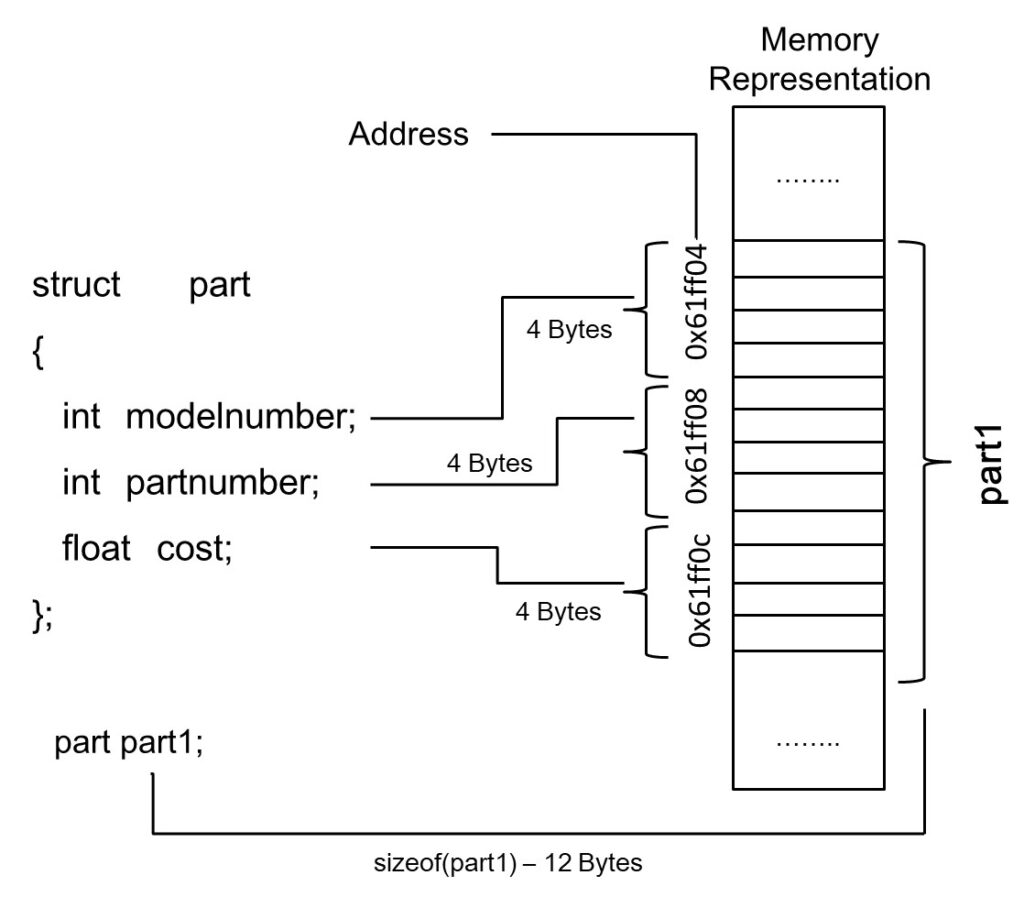
In some ways, we can think of the part structure as the specification for a new data type.
The format for defining a structure variable is the same as that for defining a basic built-in data type such as int.
part part1;
int var1;
C++ makes the syntax and the operation of user-defined data types as similar as possible to that of built-in data types.
In C you need to include the keyword struct in structure definitions, as in struct part part1; In C++ the keyword ‘struct’ is not necessary.
Once a structure variable has been defined, its members can be accessed using the dot operator.
For Example: part1.modelnumber = 6244;
This means modelnumber is a member of part1. The real name of the dot operator is the member access operator.
cout << "nModel " << part1.modelnumber;
//StructureEx2.cpp
// uses parts inventory to demonstrate structures
#include <iostream>
using namespace std;

struct part //declare a structure
{
    int modelnumber; //ID number of widget
    int partnumber; //ID number of widget part
    float cost; //cost of part
};

int main()
{
    part part1; //define a structure variable
    part1.modelnumber = 6244; //give values to structure members
    part1.partnumber = 373;
    part1.cost = 217.55F;
    //display structure members
    cout << "Model " << part1.modelnumber;
    cout << ", part " << part1.partnumber;
    cout << ", costs $" << part1.cost << endl;
    return 0;
}
Model 6244, part 373, costs $217.55
Note: We can create multiple variables of the structure, and each variable reserves a separate space in memory.
part part1, part2, part3;
Here, part1, part2, and part3 are three different structure variables and reserve a separate memory space for all data members.
The following figure shows the memory representations of structure variables part1, part2, and part3.

No, multiple structure objects do not always have continuous memory addresses. While the members within a single structure are stored contiguously, the addresses of separate structure instances are not guaranteed to be adjacent in memory
We can initialize the structure variable at the time of creation also. Refer to Example 1 and Example 2.
struct part
{
   int modelnumber;
   int partnumber;
   float cost;
};

int main()
{
   part part1 = { 6244, 373, 217.55F };
}
struct part //declare a structure
{
    int modelnumber; //ID number of widget
    int partnumber; //ID number of widget part
    float cost; //cost of part
} part1 = {6244, 373, 217.55F},part2;
//StructureEx3.cpp
//Showing initialization of structure variables
#include <iostream>
using namespace std;

struct part //specify a structure
{
    int modelnumber; //ID number of widget
    int partnumber; //ID number of widget part
    float cost; //cost of part
};

int main()
{ //initialize variable
    part part1 = { 6244, 373, 217.55F };
    part part2; //define variable

    //display first variable
    cout << "Model " << part1.modelnumber;
    cout << ", part " << part1.partnumber;
    cout << ", costs $" << part1.cost << endl;

    part2 = part1; //assign first variable to second
    //display second variable
    cout << "Model " << part2.modelnumber;
    cout << ", part " << part2.partnumber;
    cout << ", costs $" << part2.cost << endl;
    return 0;
}
Model 6244, part 373, costs $217.55
Model 6244, part 373, costs $217.55
The value of each member of part 1 is assigned to the corresponding member of part 2. Since a large structure can have dozens of members, such an assignment statement can require the computer to do a considerable amount of work.
Note: One structure variable can be assigned to another only when they are of the same structure type.
In C programming, a struct (structure) can be passed to a function in two main ways:
A copy of the structure is passed to the function.
Changes made inside the function do not affect the original structure.
A pointer to the structure is passed.
Changes made inside the function do affect the original structure.
#include<stdio.h>

// Define a structure
struct Student {
    int roll;
    float marks;
};

// Function: Pass by value
void displayByValue(struct Student s) {
    printf("Inside displayByValue:\n");
    printf("Roll: %d, Marks: %.2f\n", s.roll, s.marks);
    s.marks = 100.0;  // This change won't affect the original
}

// Function: Pass by reference
void displayByReference(struct Student* s) {
    printf("Inside displayByReference:\n");
    printf("Roll: %d, Marks: %.2f\n", s->roll, s->marks);
    s->marks = 100.0;  // This change will affect the original
}

int main() {
    struct Student stu = {101, 85.5};

    // Pass by value
    displayByValue(stu);
    printf("After displayByValue: Marks = %.2f\n", stu.marks);

    // Pass by reference
    displayByReference(&stu);
    printf("After displayByReference: Marks = %.2f\n", stu.marks);

    return 0;
}
Inside displayByValue:
Roll: 101, Marks: 85.50
After displayByValue: Marks = 85.50
Inside displayByReference:
Roll: 101, Marks: 85.50
After displayByReference: Marks = 100.00
The function returns a copy of the structure.
The function returns a pointer to a structure (useful when the structure is large or when you want to modify the original).
#include<stdio.h>
#include<stdlib.h>

// Define a structure
struct Student {
    int roll;
    float marks;
};

// Function 1: Return structure by value
struct Student getStudentByValue() {
    struct Student s;
    s.roll = 101;
    s.marks = 88.5;
    return s;  // Return a copy of the structure
}

// Function 2: Return structure by pointer
struct Student* getStudentByPointer() {
    struct Student* s = (struct Student*)malloc(sizeof(struct Student));
    s->roll = 102;
    s->marks = 92.3;
    return s;  // Return pointer to dynamically allocated structure
}

int main() {
    // Using function that returns by value
    struct Student s1 = getStudentByValue();
    printf("Returned by Value:\n");
    printf("Roll: %d, Marks: %.2f\n\n", s1.roll, s1.marks);

    // Using function that returns by pointer
    struct Student* s2 = getStudentByPointer();
    printf("Returned by Pointer:\n");
    printf("Roll: %d, Marks: %.2f\n", s2->roll, s2->marks);

    // Free dynamically allocated memory
    free(s2);

    return 0;
}
Returned by Value:
Roll: 101, Marks: 88.50

Returned by Pointer:
Roll: 102, Marks: 92.30
Nice
Helping a lot….
Crystal clear
good explanation
You must be logged in to submit a review.


 Google