
Course:
Complete Java Programming Course


In this lesson, you will learn
Control statements in Java are constructs that allow you to control the flow of execution of your program.
Java’s program control statements can be put into the following categories: selection, iteration, and jump.
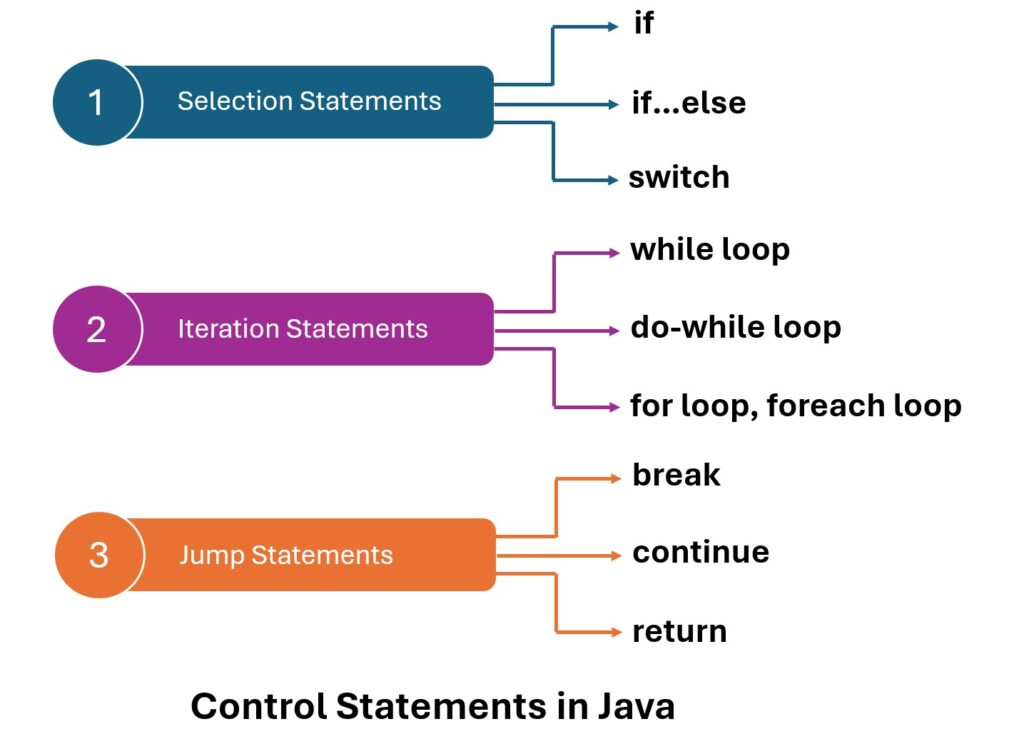
Selection statements allow your program to choose different execution paths based on the outcome of an expression or the state of a variable.
The most commonly used selection/decision-making statements are if, else if, switch, and the ternary operator.
Here’s a brief explanation of each, with examples.
It executes a block of code if a specified condition is true.
Syntax
<pre class="wp-block-syntaxhighlighter-code">if (condition) {
    // Code to execute if the condition is true
}<br>
</pre>
condition: A boolean expression that evaluates to true or false.condition evaluates to true, the code inside the if block is executed.condition evaluates to false, the code inside the if block is skipped.
int number = 10;
if (number > 5) {
    System.out.println("The number is greater than 5.");
}
This code checks if number is greater than 5. Since it is (10 > 5), it prints “The number is greater than 5.”
char grade = 'A';
if (grade == 'A') {
    System.out.println("Excellent!");
}
This code checks if grade is ‘A’. Since it is, it prints “Excellent!”
boolean isRaining = false;
if (isRaining) {
    System.out.println("Take an umbrella.");
}
This code checks if isRaining is true. Since it’s false, nothing is printed.
int age = 20;
boolean hasTicket = true;
if (age >= 18 && hasTicket) {
    System.out.println("You can enter the concert.");
}
This code checks if the person is 18 or older and has a ticket. Both conditions are true, so it prints “You can enter the concert.”
In Java, if-else statements are used to execute different blocks of code based on whether a condition is true or false.
These statements allow for basic decision-making in your program.
Syntax
if (condition) {
    // Code to execute if condition is true
} else {
    // Code to execute if condition is false
}
if the expression is true, it executes the block of code inside the if clause; otherwise, it executes the code inside the else clause (if present).
Here are three different examples to illustrate its use
int number = 10;
if (number % 2 == 0) {
    System.out.println("The number is even.");
} else {
    System.out.println("The number is odd.");
}
This code checks if number is even. Since 10 is divisible by 2, it prints “The number is even.”
int age = 25;
if (age < 18) {
    System.out.println("You are a minor.");
} else {
    System.out.println("You are an adult.");
}
Here, the code categorizes a person as a minor or adult based on their age. Since the age is 25, it prints “You are an adult.”
boolean isSunny = true;
boolean isWeekend = false;

if (isSunny && isWeekend) {
    System.out.println("Let's go to the beach!");
} else {
    System.out.println("Not a perfect day for the beach.");
}
This example checks two conditions: whether it’s sunny and whether it’s the weekend. The message “Not a perfect day for the beach.” is printed since it’s not the weekend.
In Java, a nested if statement is a control flow structure where you have an if statement inside another if or else if statement.
This construct allows for more complex decision-making processes by enabling you to check multiple conditions sequentially or hierarchically.
int age = 20;
boolean hasLicense = true;

if (age >= 18) {
    if (hasLicense) {
        System.out.println("You can drive.");
    } else {
        System.out.println("You cannot drive without a license.");
    }
}
In this example, the outer if checks if the person is 18 or older. If this condition is true, the inner if checks if the person has a driving license.
This allows for more precise control over what gets executed.
package ch5;

public class FindGrades {

	public static void main(String[] args) {
		int marks = 85;

		if (marks > 50) {
		    if (marks > 75) {
		        System.out.println("Grade: Distinction");
		    } else if (marks > 60) {
		        System.out.println("Grade: First Class");
		    } else {
		        System.out.println("Grade: Pass");
		    }
		} else {
		    System.out.println("Grade: Fail");
		}
	}
}
Grade: Distinction
Here, the outer if checks if the student has passed (marks greater than 50). Depending on the range in which the marks fall, different grades are assigned.
package ch5;

public class FindTemp {

	public static void main(String[] args) {
		int temp = 30;
		boolean isRaining = false;

		if (temp > 20) {
		    if (isRaining) {
		        System.out.println("Take an umbrella.");
		    } else {
		        System.out.println("Wear light clothes.");
		    }
		} else {
		    if (isRaining) {
		        System.out.println("Wear a jacket and take an umbrella.");
		    } else {
		        System.out.println("Wear a warm coat.");
		    }
		}

	}
}
Wear light clothes.
This example demonstrates a more complex decision-making scenario involving weather conditions. The outer if checks the temperature, while the inner if further checks whether it’s raining.
The if-else-if ladder in Java is a chain of if, else if, and optionally a else block that provides a way to execute one of many code paths based on multiple conditions.
This construct is useful when you have several mutually exclusive conditions to check.
if (condition1) {
    // Code to execute if condition1 is true
} else if (condition2) {
    // Code to execute if condition2 is true
} else if (condition3) {
    // Code to execute if condition3 is true
} ...
else {
    // Code to execute if none of the above conditions are true
}
package ch5;

public class CalculatingTax {

	public static void main(String[] args) {
		double income = 75000.0;
		double tax;

		if (income <= 25000.0) {
		    tax = 0.1 * income;  // 10% tax
		} else if (income <= 50000.0) {
			// 10% for first 25k, then 20%
		    tax = 2500.0 + 0.2 * (income - 25000.0);
		} else if (income <= 100000.0) {
			// 20% for next 25k, then 30%
		    tax = 7500.0 + 0.3 * (income - 50000.0);
		} else {
			// 30% for next 50k, then 40%
		    tax = 22500.0 + 0.4 * (income - 100000.0);
		}

		System.out.println("Tax to be paid: " + tax);
	}
}
Tax to be paid: 15000.0
This example calculates the tax based on income ranges using progressive tax rates.
package ch5;

public class CalculatingGrade {

	public static void main(String[] args) {
		int marks = 82;
		String grade;

		if (marks >= 90) {
		    grade = "A+";
		} else if (marks >= 80) {
		    grade = "A";
		} else if (marks >= 70) {
		    grade = "B";
		} else if (marks >= 60) {
		    grade = "C";
		} else if (marks >= 50) {
		    grade = "D";
		} else {
		    grade = "F";
		}

		System.out.println("Grade: " + grade);
	}
}
Grade: A
Here, the student’s marks are used to determine their grade. Each else if block checks a range of marks.
package ch5;

public class DriverEligibility {

	public static void main(String[] args) {
		int age = 35;
		boolean hasDrivingLicense = true;
		boolean hasGoodVision = false;

		if (age < 18) {
		    System.out.println("Not eligible for driving.");
		} else if (age >= 18 && !hasDrivingLicense) {
		    System.out.println("Please obtain a driving license.");
		} else if (hasDrivingLicense && !hasGoodVision) {
		    System.out.println("Driving not recommended without proper vision.");
		} else {
		    System.out.println("Eligible for driving.");
		}
	}
}
Driving not recommended without proper vision.
This example uses a combination of age, driving license status, and vision condition to determine driving eligibility, showcasing how complex conditions can be evaluated in an if-else-if ladder.
There are no reviews yet. Be the first one to write one.
You must be logged in to submit a review.


 Google