
Course:
Complete Java Programming Course


In this lesson, you will learn
A dog is a class that defines characteristics such as color, length, height, weight, breed, etc., and behaviors such as jumping, barking, sleeping, walking, and shaking.
These characteristics are known as the member variables, and methods specify the behavior.
The use of the class keyword declares a class in Java.
class
{
	//Fields
	datatype instance-var1;
	datatype instance-var2;
	----------------------
	----------------------
	datatype instance-varN;

	// Constructor
	ClassName() {
		// Constructor body
	}

	//Methods
	datatype methodName1(parameter-list)
	{
		//Method Body
	}

	// ..........

	datatype methodNameN(parameter-list)
	{
		//Method Body
	}
}
The data (variables) defined within a class are called instance variables,, and the code is contained within methods.
Collectively, the methods, variables, and constructors defined within a class are called class members.
Constructor: A special method that is called when an instance (object) of the class is created. Constructors have the same name as the class and do not return a value.
Constructors are discussed in the upcoming lessons.
Note: Variables defined within a class are called instance variables because each instance of the class (i.e., each object of the class) contains a separate copy of instance variables.
class Rectangle
{
	//Fields declaration
	double length;
	double width;

	// Method to display Rectangle Dimensions
	void displayDimensions()
	{
		System.out.println("Length: "+length);
		System.out.println("Width: " +width);
	}
}
Here, ‘Rectangle’ is a class that defines two instance variables: length and width. We have added a method named displayDimensions() to display a rectangle’s dimensions.
An object is an instance of a class and has a unique identity. The following code snippet shows how to declare an object of a class.
type arrayName[arraySize];
Rectangle r1; //r1 is an object name
The code above only declares an object, without allocating memory for it. To allocate memory to the object, you need to instantiate the object by using the ‘new’ operator.
The ‘new’ operator allocates memory to an object. It also returns a reference to that memory location in the object variable.
The following code snippet shows how to instantiate an object.
r1 = new Rectangle(); //r1 is an object name
Now, an object r1 is an instance of the Rectangle class. Thus, it is a “physical” reality and holds space for its member variables.
You can declare and instantiate an object using a single statement as follows.
Rectangle rect1 = new Rectangle(); //rect1 is an object name
There is no limitation on creating objects of a class. You can create multiple objects of a class.
Rectangle rect1 = new Rectangle();
Rectangle rect2 = new Rectangle();
//........
Rectangle rectN = new Rectangle();
When you create an instance (i.e., object) of a class, then each object contains a separate copy of each instance variable defined by the class. Thus, every Rectangle object(rect1, rect2, ……rectN) will contain its separate copies of the instance variable i.e. length, and width as shown in the below figure.

A class is not an object. (but it’s used to construct them)
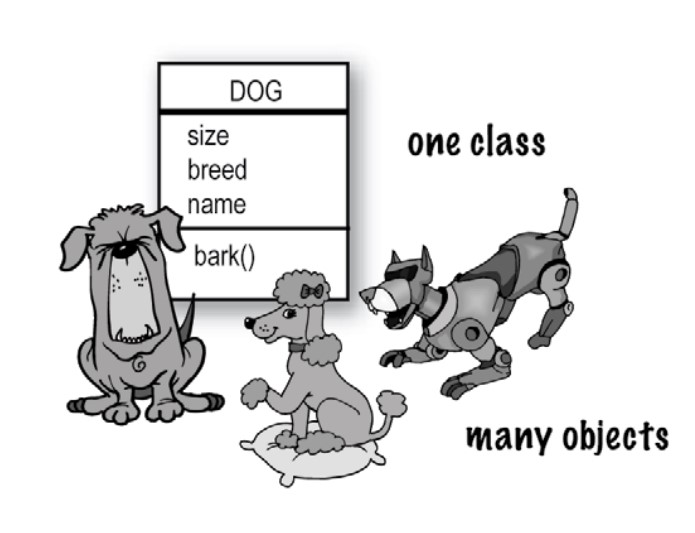
A class is a blueprint for an object. It tells the virtual machine how to make an object of that particular type.
Each object of that class can have its own values for that class’s instance variables.
For example, you might use the Button class to create dozens of buttons, each with its own color, size, shape, label, and so on.
The dot operator (.) gives you access to an object’s state and behavior (instance variables and methods).
objectname.members; //members may be variable or method
//Accessing and assigning value to a instance variables
rect1.length=10.0;
rect1.width=15.5;

//Accessing method
rect1.displayDimensions();
public class RectangleExample1 {

	//Fields declaration
    double length;
    double width;

    // Method to display Rectangle Dimensions
    void displayDimensions()
    {
        System.out.println("Length: "+length);
        System.out.println("Width: " +width);
    }

	public static void main(String[] args) {
		RectangleExample1 rect1=new RectangleExample1();
		rect1.length=3.0;
		rect1.width=4.0;
		rect1.displayDimensions();
	}
}
Length: 3.0
Width: 4.0
This Rectangle class has two fields (length and width), a method displayDimensions() displays the Rectangle’s length and width. The main method creates an object rect1 of class Rectangle and calls the displayDetails() method.
public class CircleExample {

    // Fields declaration
    double radius;

    // Method to display Circle details
    void displayCircle() {
        System.out.println("Radius: " + radius);
        System.out.println("Area: " + (3.14 * radius * radius));
    }

    public static void main(String[] args) {
        CircleExample circle1 = new CircleExample();
        circle1.radius = 5.0;
        circle1.displayCircle();
    }
}
Radius: 5.0
Area: 78.5
This program defines a class called CircleExample with one field: radius. In the main method, an object circle1 is created and the radius is assigned a value. The displayCircle() method prints the radius and calculates the area using the formula:
Area=3.14×radius×radius;
This example shows how to:
Declare a class and field
Create an object
Assign values
Call a method that performs a calculation
public class StudentExample {

    // Fields declaration
    String name;
    int age;

    // Method to display student details
    void displayStudent() {
        System.out.println("Name: " + name);
        System.out.println("Age: " + age);
    }

    public static void main(String[] args) {
        StudentExample student1 = new StudentExample();
        student1.name = "John";
        student1.age = 20;
        student1.displayStudent();
    }
}
Name: John
Age: 20
This program defines a class StudentExample with two fields: name and age. In the main method, a StudentExample object is created and values are assigned. The displayStudent() method prints the student’s details.
This example demonstrates:
Storing different types of data (String and int)
Accessing object properties
Displaying object information
public class CarExample {

    // Fields declaration
    String brand;
    int year;

    // Method to display car details
    void displayCar() {
        System.out.println("Brand: " + brand);
        System.out.println("Year: " + year);
    }

    public static void main(String[] args) {
        CarExample car1 = new CarExample();
        car1.brand = "Toyota";
        car1.year = 2022;
        car1.displayCar();
    }
}
Brand: Toyota
Year: 2022
This class CarExample contains two fields: brand and year. An object is created in the main method, and values are assigned to represent a car. The displayCar() method prints the car details.
This example shows:
How objects represent real-world entities
Assigning and displaying object data
public class EmployeeExample {

    // Fields declaration
    String employeeName;
    double salary;

    // Method to display employee details
    void displayEmployee() {
        System.out.println("Employee Name: " + employeeName);
        System.out.println("Salary: " + salary);
    }

    public static void main(String[] args) {
        EmployeeExample emp1 = new EmployeeExample();
        emp1.employeeName = "Alice";
        emp1.salary = 50000;
        emp1.displayEmployee();
    }
}
Employee Name: Alice
Salary: 50000.0
The EmployeeExample class has two fields: employeeName and salary. In the main method, an employee object is created and values are assigned. The displayEmployee() method prints employee information.
This example demonstrates:
Using double data type for decimal values
Representing employee details using a class
public class BookExample {

    // Fields declaration
    String title;
    String author;

    // Method to display book details
    void displayBook() {
        System.out.println("Title: " + title);
        System.out.println("Author: " + author);
    }

    public static void main(String[] args) {
        BookExample book1 = new BookExample();
        book1.title = "Java Programming";
        book1.author = "James Gosling";
        book1.displayBook();
    }
}
Title: Java Programming
Author: James Gosling
The BookExample class contains two fields: title and author. In the main method, a book object is created and values are assigned. The displayBook() method prints the book details.
This example shows:
How classes can represent objects like books
How to store and display textual data.
There are no reviews yet. Be the first one to write one.
You must be logged in to submit a review.


 Google