
Course:
Complete Java Programming Course

In this lesson, you will learn
In Java, a String is a sequence of characters. Unlike primitive data types, String is a class, specifically java.lang.String. This means that strings are objects, and they have methods that can be used to manipulate them.
Key Characteristics of Java Strings:
String object is created, its value cannot be changed. Any operation that appears to modify a string actually creates a new String object.char Array: Internally, a String is represented as an array of char (Unicode characters).java.lang: The String class is part of the java.lang package, so you don’t need to import it explicitly.
However, Java also offers classes for mutable strings: StringBuilder and StringBuffer.
Below is an explanation of these classes, including their mutability or immutability.
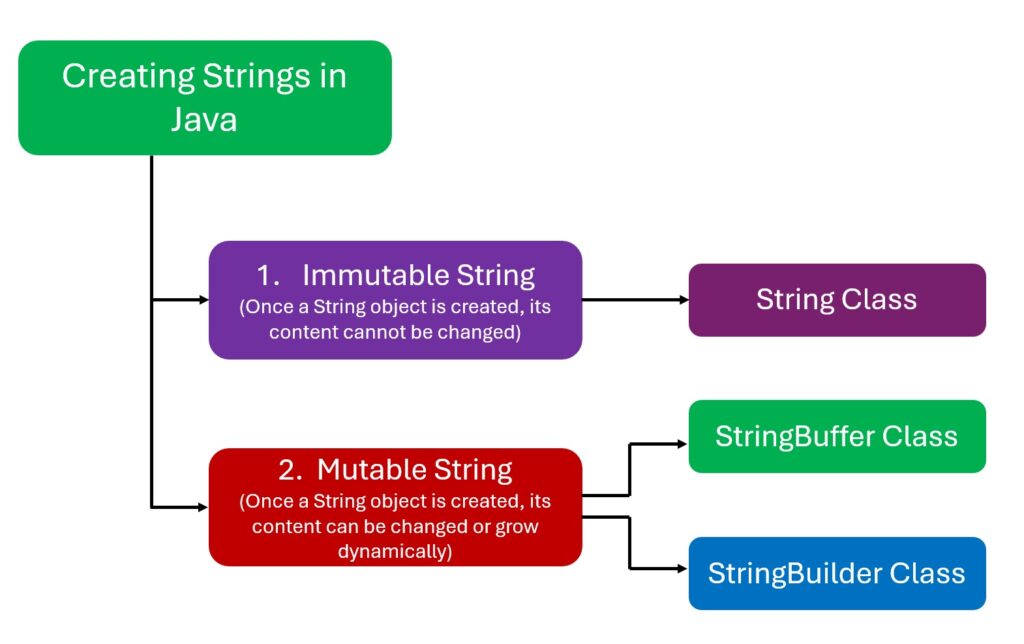
String is a sequence of characters that is treated as an object.
There are mainly two ways to create a String in Java.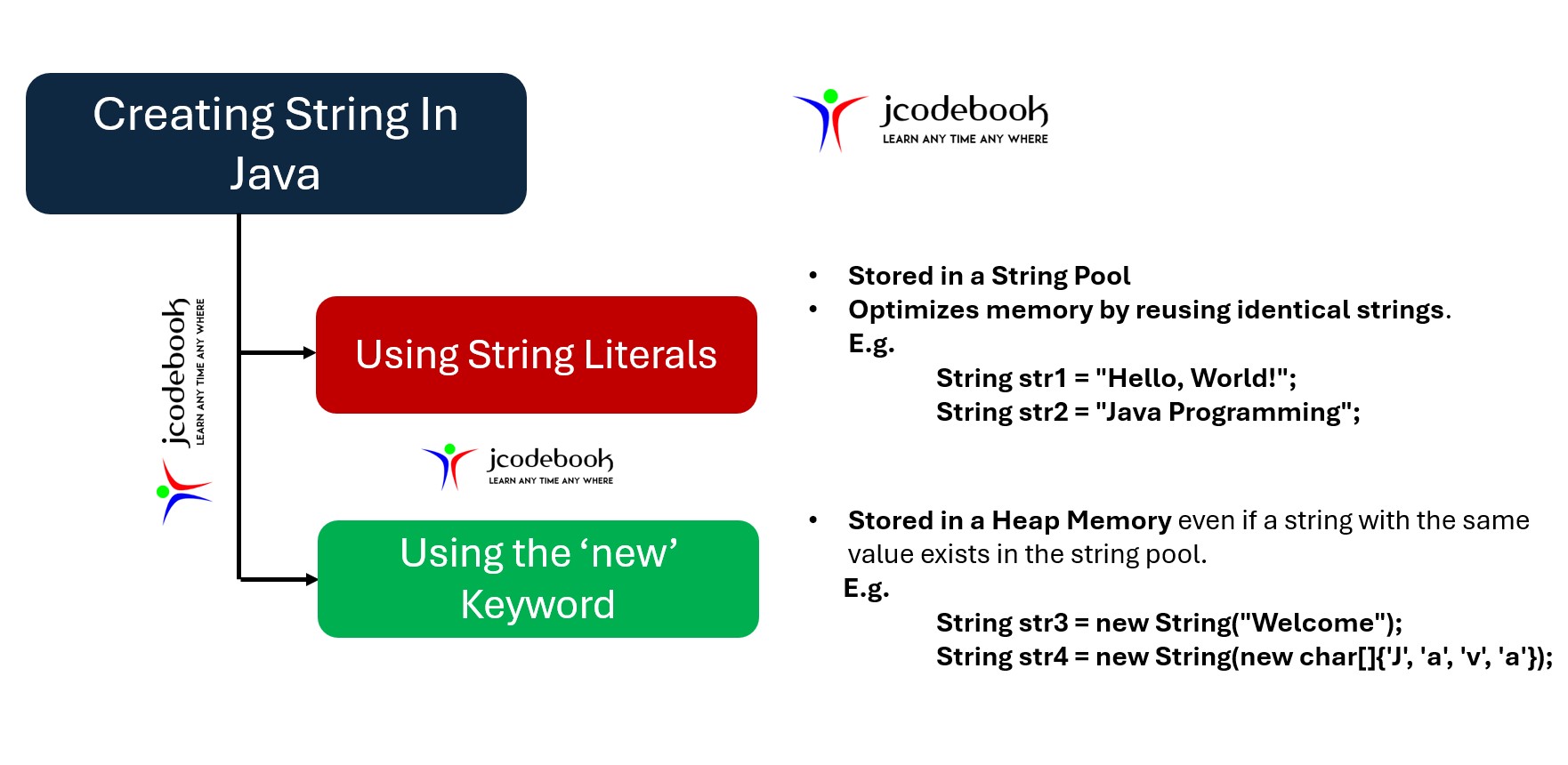
1. This is the most common method to create a string. When you create a string using a string literal, Java first looks in the string pool to check if an identical string already exists.
2. If a match is found, it returns a reference to that same instance; if not, a new string instance is created and placed in the pool.
String s1 = "Hello";
String s2 = "Hello";
/* s1 and s2 refer to the same instance
in the string constant pool */
Note: In the JVM, a special memory area, the string constant pool, is used to store string literals.
The figure below shows how string literals are stored in the String Constant Pool and refer to the same string objects.
String s1 = "Hello";
String s2 = "Hello";
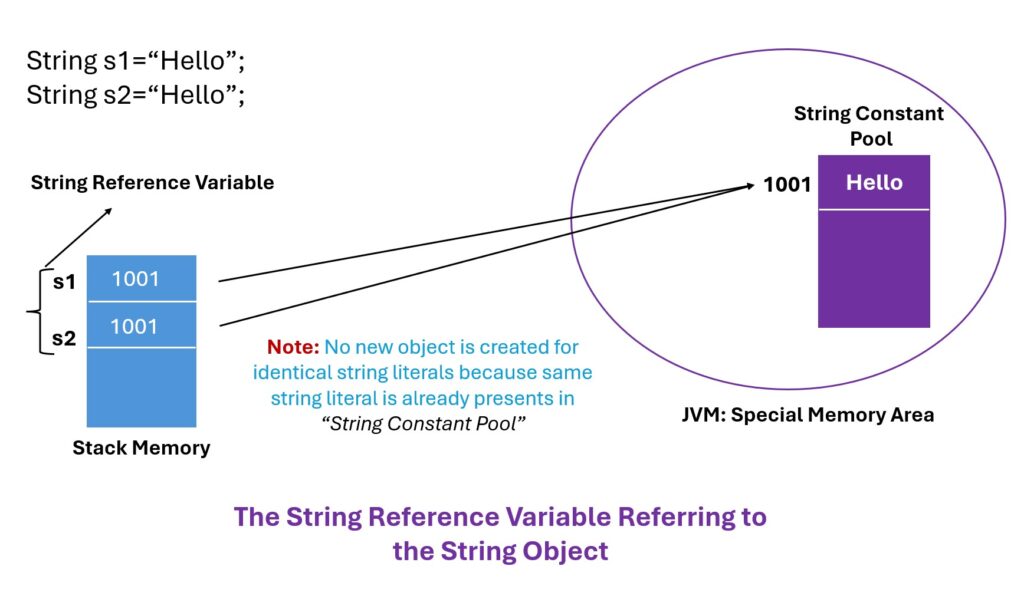
If you append the string literal, “World”, to the string reference variable, s1, then a new string object, “HelloWorld”, is created in the memory, and the variable, s1, will refer to the new string object.
String s1="Hello";
s1=s1+"World";
However, the string object “Hello” still exists in memory but has no references, as shown in the following figure.
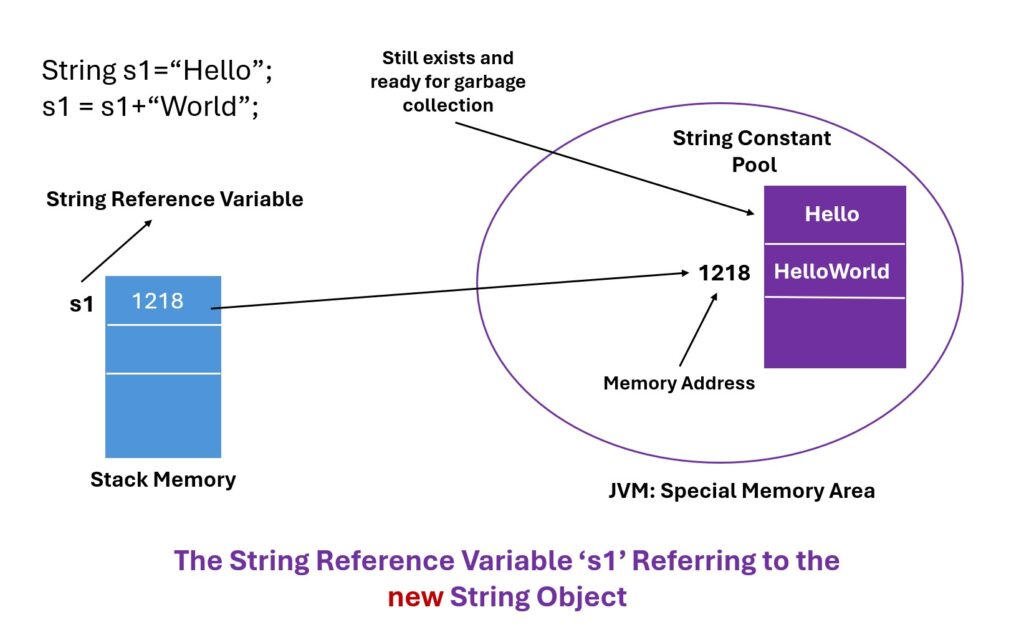
Note: Thus, every time you manipulate a string object, a new string object is created in the memory. Therefore, the String object is called an immutable object.
package ch11.l1;

public class StringExample1 {
	public static void main(String[] args) {

		String s1 = "Hello"; //use string literal
		String s2 = "Hello";
		System.out.println("s1 hashcode: "+s1.hashCode());
		System.out.println("s2 hashcode: "+s2.hashCode());
		//Modifying String s1
		s1+="World";
		/* New object is created for "HelloWorld" literal,
		 * and now s1 is reffering to new object and s2
		 * still referring to "Hello"
		 */
		System.out.println("----------nAfter Modificationn----------");
		System.out.println("s1 hashcode: "+s1.hashCode());
		System.out.println("s2 hashcode: "+s2.hashCode());
	}
}
s1 hashcode: 69609650
s2 hashcode: 69609650
----------
After Modification
----------
s1 hashcode: 439329280
s2 hashcode: 69609650
hashCode() method returns the hash code for an object.hashCode() method is defined in the Object class.1. If two objects are equal according to the equals(Object) method, then calling the hashCode method on each object must produce the same integer result.
2. It is not required that if two objects are unequal according to the equals(java.lang.Object) method, then calling the hashCode method on each of the two objects must produce distinct integer results. However, the programmer should be aware that producing distinct integer results for unequal objects can improve hash table performance.
Strings created with the new keyword are stored in the heap memory, and a new string object is created even if an identical string already exists in the string pool.
String s3 = new String("Hello");
/* s3 is a different instance in the heap,
not in the string pool */
Heap memory is an area within the JVM where objects are stored.
The following figure shows the way to create a new string object using the ‘new’ keyword.
String s1 = "Hello";
String s2 = "Hello";
String s3 =  new String("Hello");
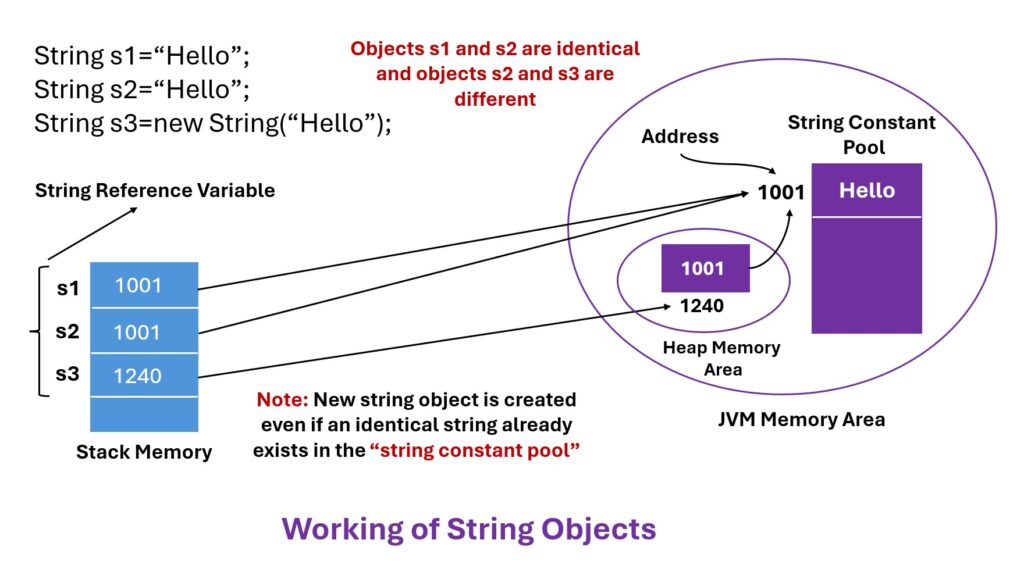
Using string literals is more memory-efficient due to the string pool mechanism. However, using the new keyword gives you a distinct string object separate from the string pool, which can be useful in certain scenarios.
The equals( ) method compares the characters inside a String object. The == operator compares two object references to see whether they refer to the same instance.
package ch11.l1;

public class StringExample2 {

	public static void main(String[] args) {
		String s1 = "Hello"; //use string literal
		String s2 = "Hello"; //use string literal
		String s3=new String("Hello");

		System.out.println(s1+" equals "+s2+" : "+s1.equals(s2));
		System.out.println(s1+" == "+s3+" : "+(s1==s3));
		System.out.println("s1 hashcode: "+s1.hashCode());
		System.out.println("s2 hashcode: "+s2.hashCode());
		System.out.println("s3 hashcode: "+s3.hashCode());
	}
}
Hello equals Hello : true
Hello == Hello : false
s1 hashcode: 69609650
s2 hashcode: 69609650
s3 hashcode: 69609650
Explanation: All objects have the same hashcode as they contain the same string literal, even though objects are not identical.
StringBuilder and StringBuffer classes.
StringBuffer and StringBuilder In Java, classes are used to create mutable sequences of characters.
The key difference between StringBuffer and StringBuilder lies in their thread safety and performance.
StringBuffer is thread-safe, which means it is synchronized. Multiple threads can safely modify an StringBuffer object without causing any inconsistency in data.StringBuffer operations are slower compared to StringBuilderbecause it requires locking the object for each operation.
package ch11.l1;

public class StringBufferExample1 {
	public static void main(String[] args) {
		StringBuffer sb = new StringBuffer("Hello");
		System.out.println("Original String: "+sb);
		System.out.println("sb hashcode: "+sb.hashCode());
		//Modifying String
		sb.append(" World");
		System.out.println("Modified String: "+sb); //Prints "Hello World"
		System.out.println("sb hashcode: "+sb.hashCode());
	}
}
Original String: Hello
sb hashcode: 883049899
Modified String: Hello World
sb hashcode: 883049899
StringBuilder is not synchronized, which means it is not thread-safe. This class should be used in scenarios where thread safety is not a concern.StringBuilder is more efficient than StringBuffer in single-threaded environments due to the lack of synchronization overhead.
StringBuilder builder = new StringBuilder("Hello");
builder.append(" World");
System.out.println(builder); // Prints "Hello World"
StringBuffer and StringBuilderStringBuffer When you need to ensure thread safety in a multi-threaded environment.StringBuilder When working in a single-threaded environment, or when thread-safety is not a concern, for better performance.
Note: Both StringBuffer and StringBuilder allow modification of strings without creating new objects for each change.
In the next lesson, you will learn different methods of String class.
This Is a great course as I am studying from sir in person so it’s much better for me but this course is as same as sir teaches in the class.Great Work.Thank You.
You must be logged in to submit a review.


 Google